








This comparison is for small Jira Cloud teams choosing between STM Lite by Redmoon Software and Easy Issue Templates for Jira by AppLiger. Both occupy the same niche: lightweight, low-cost templating for teams who aren’t ready for a full-fat templating product yet. Both are honest, focused tools. The choice comes down to a few specific differences.
The 30-second answer
STM Lite is the free-tier on-ramp to Redmoon’s full STM Issue Templates product. The template engine, syntax, and hierarchy model are the same — STM Lite is the entry point, not a fundamentally different product. If you grow into needing executors, JQL bulk-create, or Update Templates, you upgrade in place to full STM.
Easy Issue Templates is AppLiger’s standalone product, free for up to 10 users, with its own templating model. Strong on dynamic variables and pre-filling native Jira create screens; the focus is on accelerating the standard create flow rather than building a separate templating surface.
Both are good tools. The decisive question is: what’s your upgrade path if your needs grow?
Side-by-side
| Capability | STM Lite | Easy Issue Templates |
|---|---|---|
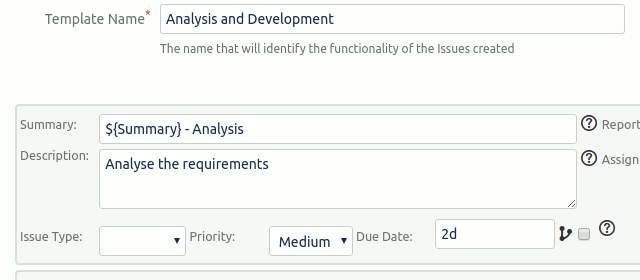
| Save reusable issue templates | ✓ | ✓ |
| Subtask templates within an issue template | ✓ | ✓ |
| Epic → Story → Sub-task hierarchies | ✓ | ✓ |
| Dynamic variable substitution in template fields | ✓ | ✓ |
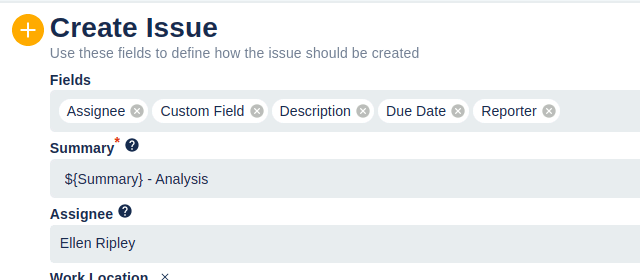
| Pre-fill native Jira create screen | ✓ | ✓ |
| Free tier | ✓ | ✓ (up to 10 users) |
| Auto-fire on issue create / transition | Upgrade to STM | Limited |
| JQL bulk-create | Upgrade to STM | ✗ |
| Update Templates (modify existing issues) | Upgrade to STM | Apply to existing issues |
| Cascading template hierarchies | ✓ | ✓ |
| Per-project template scope | ✓ | ✓ |
| Global template scope | ✓ | ✓ |
| In-place upgrade to a full templating product | ✓ (to STM) | Within AppLiger tiers |
| Jira Cloud | ✓ | ✓ |
| Jira Data Center | Use full STM on DC | ✓ |
When STM Lite is the right pick
- You expect to grow into the full STM product. STM Lite is explicitly designed as the on-ramp. Templates authored in STM Lite work without modification in full STM, so the upgrade is a licence event rather than a migration project.
- You want first-class subtask hierarchies. STM’s templating model treats Epic-Story-Sub-task hierarchies as a primary concept — you can author the whole tree once and instantiate it many times. The same model is available in STM Lite.
- You’re on the Redmoon stack already. If your org runs Comment History, Document Vault, or Secure Admin, staying with the same vendor simplifies licensing and support.
- You want a clear future path to Jira Data Center. STM has a full Data Center edition. Starting on STM Lite for Cloud and migrating later to a hybrid or DC tenancy is a straight line. AppLiger’s offering on DC is its own product with its own tier structure.
When Easy Issue Templates is the right pick
- You’re a team of 10 or fewer and want truly free. Easy Issue Templates’ free tier is specifically up to 10 users. For a small team that won’t grow soon, this is a genuinely no-cost option.
- You only ever expect to use templating, never anything else. If your needs will not grow beyond templating, an AppLiger-only stack is fine. If your needs may expand into security, audit, delegation, or move/clone — those map onto other Redmoon products that share design philosophy with STM.
- You’re already an AppLiger customer. Vendor consolidation matters for support, licensing, and procurement. If you’re running other AppLiger apps successfully, staying within the ecosystem is reasonable.
- You like the AppLiger UX. Some teams find AppLiger’s create-screen-pre-fill model more natural than building a separate template surface. Try both — it’s the cheapest possible comparison.
How to decide in one day
Both apps install for free. Both let you author a template in minutes. Recommended evaluation:
- Install STM Lite on a test project. Build the most complex template you use in production (probably an Epic with several Stories and Sub-tasks).
- Install Easy Issue Templates on a different test project. Rebuild the same template.
- Ask the project admin who’ll own templates which authoring UX they prefer.
- Look at the upgrade path: where does each app go when you outgrow it?
For most teams, the answer is clear by the end of day one.
Cost considerations
Both apps have free tiers and tiered paid pricing. Current pricing is best read from the live Marketplace listings:
- STM Lite on the Marketplace
- Easy Issue Templates on the Marketplace
- Full STM Issue Templates on the Marketplace (for the upgrade path)
At the free tier, both apps are genuinely free. Differences emerge at paid tiers, where the comparison depends on your eventual user count and the capabilities you need.
Get started
The fastest way to evaluate STM Lite is to install the free version, author a single template that includes a subtask hierarchy, and instantiate it on a real-looking issue.
See also
- STM Lite overview — the full STM Lite product page
- STM Lite user guide — every feature documented
- STM Issue Templates overview — the upgrade path for teams that outgrow STM Lite
- STM vs ScriptRunner for Jira — the comparison for teams considering a scripting platform instead
- Jira Issue Templates library — 20+ copy-and-paste template examples
- Contact Us — book a demo to plan an STM Lite to STM upgrade against your growing team