










This comparison is for teams who already need reusable Jira issue templates and are weighing STM Issue Templates against ScriptRunner for Jira as the way to deliver them. Both apps appear in many Jira admin shortlists. They occupy very different points on the no-code-to-pro-code spectrum.
The 30-second answer
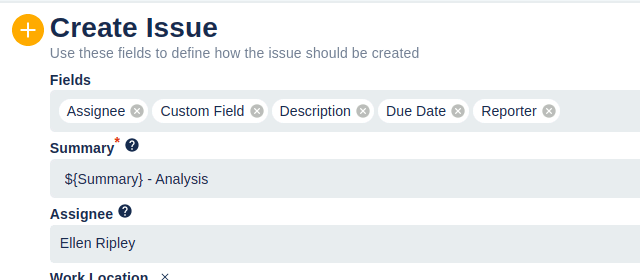
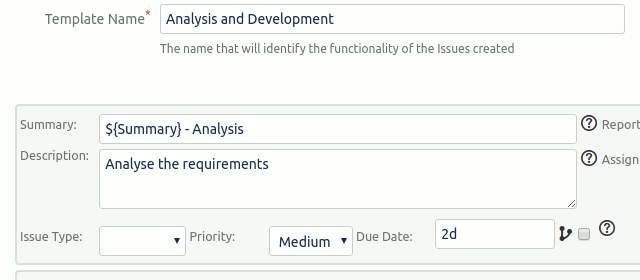
STM is a focused templating product. Templates are declarative artefacts edited through a UI by project admins. The product is built around three concepts — Templates, Executors, and Bulk operations — and does them deeply.
ScriptRunner is a Groovy scripting platform for Jira. With enough code, you can build anything. Templating is one of many things it can do; it isn’t optimised for templating in particular.
If your need is reusable issue templates — sub-task hierarchies, auto-fire on transitions, JQL bulk-create — STM is purpose-built. If your need is a general-purpose Groovy automation platform and templating happens to be one of the things you’ll use it for, ScriptRunner is a different and broader tool.
Side-by-side
| Capability | STM Issue Templates | ScriptRunner for Jira |
|---|---|---|
| Issue templates as first-class declarative objects | ✓ | ✗ (code only) |
| UI-managed templates (no code) | ✓ | ✗ (Groovy) |
| Sub-task templates supported | ✓ | ✗ (Behaviours feature does not support sub-task templates) |
| Cascading template hierarchies (epic → story → sub-task) | ✓ | ✗ (code only) |
| Auto-fire on issue create / transition / field change | ✓ | ✓ |
| JQL bulk-create / bulk-update | ✓ | Via custom scripts |
| Update Templates for existing issues | ✓ | Via custom scripts |
| Repeating templates (per component / fix version) | ✓ | Via custom scripts |
| Project + global scope for executors | ✓ | ✓ (in code) |
| Cross-project issue creation | ✓ | ✓ |
| Works without Groovy knowledge | ✓ | ✗ |
| Works on Jira Cloud + Data Center | ✓ | ✓ |
| General-purpose scripting platform | ✗ | ✓ |
| Behaviours: dynamic field show / hide / required | ✗ | ✓ |
| Custom JQL functions, scripted fields, listeners on every event | ✗ | ✓ |
| Console for ad-hoc Groovy execution | ✗ | ✓ |
When STM is the right pick
- You need sub-task hierarchies. ScriptRunner’s Behaviours feature explicitly does not support templates for sub-task types — every workaround is code. STM’s primary use case is exactly this.
- Your templates have grown. Real STM customers run templates with a large number of issue definitions in production. That scale is impractical to write and maintain as Groovy.
- You don’t have a scripting culture. Project admins manage templates. No engineering ticket, no Groovy review, no scripting-team queue.
- You want JQL-driven bulk operations. Apply a template (or an Update Template) to every issue matching a JQL query — built-in, no script required.
- You need Update Templates. Modifying existing issues from a template is a first-class scenario in STM. ScriptRunner can do it, but you write the code.
When ScriptRunner is the right pick
- You need automation that goes far beyond templating. Custom JQL functions, scripted fields, dynamic field behaviours, listeners on every Jira event, REST endpoint scripts — STM doesn’t do any of this; ScriptRunner does all of them.
- You have Groovy expertise on the team. A team that already maintains Groovy code can absorb ScriptRunner’s pattern. The same team adopting STM gets a smaller surface area, but also a smaller scope.
- You’re consolidating onto one automation app. If you already have ScriptRunner for other things, doing templating in the same tool reduces vendor count even though it costs more code.
- You need an ad-hoc scripting console. ScriptRunner’s console for one-off Groovy is invaluable for Jira admins who need to fix data at scale.
Many teams run both
STM and ScriptRunner are complementary, not competitive, for many Jira teams:
- ScriptRunner handles the bespoke automation that doesn’t fit a templating model — custom JQL functions, dynamic field behaviours, custom REST endpoints, ad-hoc data fixes.
- STM handles the templating model — sub-task hierarchies, executors, JQL bulk operations, update templates — because they’re declarative and don’t need code.
A common pattern is: ScriptRunner for engineering-owned automation; STM for project-admin-owned templates. Each side maintains their own surface area without stepping on the other.
Cost considerations
Both apps are priced on the Atlassian Marketplace, tiered by Jira user count. ScriptRunner is the broader, more expensive platform; STM is a focused product. The current pricing for both is always best read from the live Marketplace listings:
Many teams find that adding STM for templating is cheaper than scaling up their ScriptRunner usage to do the same work, because the marginal cost of a focused product is lower than the marginal cost of a general-purpose platform.
Migration considerations
If you’re moving template logic from ScriptRunner scripts to STM templates:
- The STM template editor will be familiar to anyone who has authored ScriptRunner workflow post-functions — same concept (configure once, fire on event), different interface (UI vs Groovy).
- The
${Field}placeholder syntax in STM is similar to ScriptRunner’s binding model, but evaluated server-side at template-run time rather than at script-execution time. - Cascading templates replace the pattern of “one script calls another script”. The cascade is declared on the template, not the script.
Plan a transition: pick one heavily-scripted template, recreate it in STM, run both side-by-side for a week, then disable the script. Repeat for each major template. Most teams find the conversion takes hours per template rather than days.
Get started
The fastest way to evaluate STM is to install the free trial against a non-production project and recreate one of your existing ScriptRunner-driven templates in it.
See also
- STM Issue Templates overview — the full STM product page
- STM user guide — every feature documented, with screenshots
- STM vs Deviniti Issue Templates for Jira — the other common shortlist comparison
- Jira Issue Templates library — 20+ copy-and-paste template examples
- STM reviews on the Marketplace — what existing STM customers say
- Contact Us — book a demo to compare side-by-side against your specific use case