








This comparison is for Jira admins who have decided that Jira’s native notification scheme is too coarse and are evaluating Watch It by Redmoon Software against Notification Assistant for Jira by Modus Create. Both apps appear on most “best Jira notification app” shortlists. They overlap in roughly half their features and diverge in the other half — pick on the diverging half.
The 30-second answer
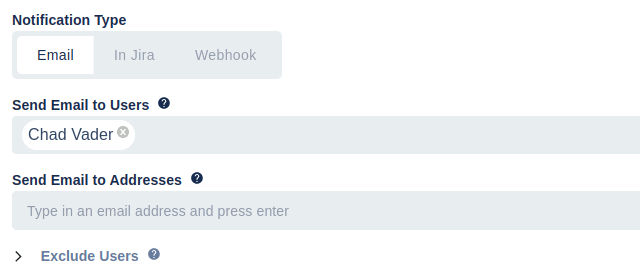
Watch It is a watcher-automation product. You define rules — “when an issue is in High priority and assigned to the SRE team, add the on-call engineer as a watcher” — and Watch It maintains the watcher list. Jira’s normal notification machinery then sends the emails. Watch It also supports direct sends to webhooks, external email, and dashboard gadgets when needed.
Notification Assistant is a notification-delivery product. It replaces or supplements Jira’s email output with richer templates — branding, attachments included in the email, last-10-comments included, recipient grouping, send-to-non-Jira-users. The “who to notify” logic is rule-driven but the emphasis is the email content.
If your problem is “the wrong people are being notified,” Watch It. If your problem is “the people getting notified can’t tell what the email is about,” Notification Assistant.
Side-by-side
| Capability | Watch It | Notification Assistant |
|---|---|---|
| Auto-add watchers based on conditions | ✓ | Partial |
| Rich condition language (JQL, fields, transitions) | ✓ | ✓ |
| Send to non-Jira email addresses | ✓ | ✓ |
| Send to webhooks | ✓ | ✗ |
| Dashboard gadget delivery | ✓ | ✗ |
| Templated email content | Basic | ✓ (rich) |
| Attachments included in email | Via Jira | ✓ (up to 21MB) |
| Last-N comments included in email | Via Jira | ✓ (up to 10) |
| Manual ad-hoc notification send | ✓ | ✓ |
| Per-project rule scope | ✓ | ✓ |
| Data-residency control | Via Jira | ✓ (USA/Germany) |
| Jira Cloud edition | ✓ | ✓ |
| Jira Data Center edition | ✓ | ✗ (Cloud-only) |
| Designed primarily around watcher rules | ✓ | ✗ |
| Designed primarily around email content | ✗ | ✓ |
When Watch It is the right pick
- You’re on Jira Data Center. Watch It has a mature Data Center edition. Notification Assistant is currently a Cloud-only product. If your org runs Data Center, the comparison effectively ends here.
- Your problem is the watcher list, not the email. When the right people are added as watchers, Jira’s built-in notification scheme already sends a reasonable email. The pain is keeping the watcher list correct as issues change. That’s Watch It’s central use case.
- You need webhooks or dashboard gadgets. Watch It can drive notifications to a Slack webhook, a third-party PagerDuty endpoint, or a Jira dashboard gadget for at-a-glance team visibility. Notification Assistant focuses on email.
- You want one set of rules driving Jira-native and external delivery. Because Watch It adds watchers, anything that already subscribes to Jira’s notification stream (Slack apps, email, mobile push) picks up the change automatically.
When Notification Assistant is the right pick
- You need notifications to non-Jira users. External vendors, executive stakeholders, customers without Jira licences — Notification Assistant is built for this. Watch It supports external email but Notification Assistant’s template editor is richer.
- Email content matters. When the recipient won’t click into Jira and needs the email itself to contain enough information to act, Notification Assistant’s ability to embed last-N comments and attachments is genuinely useful. Native Jira and Watch It produce thinner emails.
- You need data residency. Notification Assistant supports choosing USA or Germany for operational data storage to help with GDPR / CCPA / regional compliance.
- You only run Cloud. Notification Assistant is Cloud-only and well-integrated with the Cloud UX.
Many teams run both
These apps are often deployed together with no functional overlap:
- Watch It maintains the watcher list and drives webhook-based escalations (PagerDuty, Slack, dashboard).
- Notification Assistant replaces selected Jira emails with templated, attachment-rich versions for external stakeholders.
A common pattern: Watch It handles the internal flow (engineers, on-call, project members), Notification Assistant handles the external flow (customers, vendors, regulators). Different audiences, different tools — but both fired by the same Jira events.
Cost considerations
Both apps are priced on the Atlassian Marketplace, tiered by Jira user count. Current pricing is best read from the live Marketplace listings:
The two apps target different problems and are not strictly price-comparable. Decide based on which capability matches your bottleneck — paying for the wrong app is more expensive than paying more for the right one.
Get started
The fastest way to evaluate Watch It is to install the free trial, define a rule that adds your on-call group as watchers when priority is Highest, and create a test issue at that priority.
See also
- Watch It overview — the full product page
- Watch It user guide — every feature documented
- Watch It use cases — scenarios where the app pays for itself
- Watch It features — complete feature list
- Watch It reviews — what existing customers say
- Contact Us — book a demo to walk through your notification rules against your team’s actual escalation paths