









This comparison is for Jira admins who have decided that native Jira custom fields are too coarse for their needs and are evaluating Custom Fields for Projects by Redmoon Software against Deviniti Dynamic Forms for Jira. Both apps appear on Atlassian admin shortlists for “extend Jira custom fields.” They are often described as competitors but in practice they solve substantially different problems.
The 30-second answer
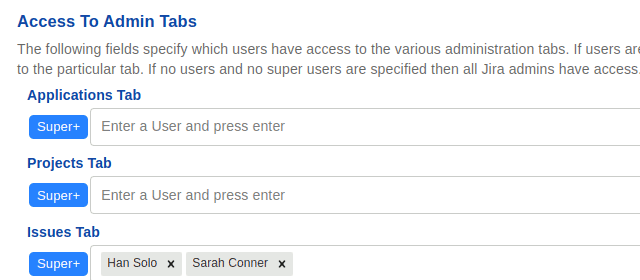
Custom Fields for Projects (Redmoon) extends Jira’s custom-field model along two axes that native Jira does not: project scope (a field that exists only in certain projects) and field-level security (a field that only certain users can see or edit, regardless of issue-level permissions). It’s the right pick when you want sensitive fields locked down.
Deviniti Dynamic Forms extends Jira’s form rendering with conditional logic, cascading selects, dependent fields, and richer form structure. It’s the right pick when you want the request or create-issue form to feel dynamic.
The two apps don’t overlap heavily in their primary value. If you read carefully, you’ll notice each app’s marketing emphasises what the other doesn’t do. That’s accurate — they’re sibling products in the same category, not direct competitors.
Side-by-side
| Capability | Custom Fields for Projects | Deviniti Dynamic Forms |
|---|---|---|
| Per-project field scope | ✓ | Partial (via contexts) |
| Field-level read security (per group/role) | ✓ | ✗ |
| Field-level write security (per group/role) | ✓ | ✗ |
| Conditional show/hide (dynamic forms) | ✗ | ✓ |
| Cascading select fields | Standard | Dynamic (value-driven) |
| Dependent fields (one field’s value drives another) | ✗ | ✓ |
| Multi-value bundled fields | ✗ | ✓ |
| Hides field entirely from unauthorised users | ✓ | ✗ |
| Works on issue create screen | ✓ | ✓ |
| Works on issue view screen | ✓ | ✓ (where rendered) |
| Works on edit screen | ✓ | ✓ |
| Works on JSM request portal | ✓ | ✓ |
| Audit trail of field-value changes | Via Jira | Via Jira |
| Jira Cloud edition | ✓ | ✓ |
| Jira Data Center edition | ✓ | ✓ |
When Custom Fields for Projects is the right pick
- You have sensitive data in custom fields. Salary band, internal cost, vendor contract value, customer NPS — these belong on a Jira issue but should not be visible to every project member. Custom Fields for Projects hides them by group/role.
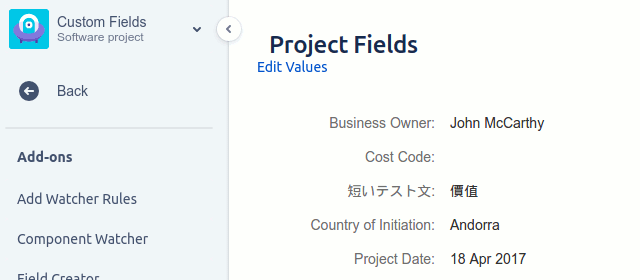
- You want per-project field scope. Native Jira lets one custom field appear in many projects through field configuration schemes. The Redmoon app makes “this field exists only in Finance projects” a first-class concept.
- You’re consolidating onto fewer apps. Custom Fields for Projects pairs naturally with Comment Security Default and Document Vault — the same Redmoon design model of “default-deny, scope-down, audit everything” applies across all three.
- You need a clean Data Center story. Both editions of Custom Fields for Projects use the same field-security model so DC and Cloud configurations look the same to administrators.
When Deviniti Dynamic Forms is the right pick
- Your request form is too long. A 30-field create screen with most fields irrelevant most of the time is a user-experience problem, not a security problem. Conditional show/hide collapses that into a 5-field form that grows as the user fills it in.
- You need cascading data. Pick a Region, then a Country (filtered to that region), then a City (filtered to that country). Deviniti’s Dynamic Forms support this natively. Custom Fields for Projects does not.
- You’re invested in Deviniti’s ecosystem. Customers running Deviniti’s Issue Templates, Extension for JSM, or other Deviniti products usually consolidate field logic in the same vendor for simpler support.
- You have a heavy Jira Service Management request portal. Deviniti has a specific Extension for JSM that complements Dynamic Forms — together they cover most JSM request-form requirements.
Many teams run both
These apps are often deployed side-by-side because they solve different layers of the same problem:
- Deviniti Dynamic Forms drives the request-form user experience — what fields the user sees, in what order, based on the values they’re entering.
- Custom Fields for Projects drives the data security — who can see and edit each field’s value, once entered.
A common pattern in regulated industries (financial services, healthcare): use Dynamic Forms to make the customer-facing JSM portal feel modern; use Custom Fields for Projects to ensure the resulting “Cost Center” and “Customer SSN-fragment” fields are visible only to authorised back-office users.
Cost considerations
Both apps are priced on the Atlassian Marketplace, tiered by Jira user count. The current pricing is best read from the live Marketplace listings:
The two products are not in the same pricing tier — Deviniti is a broad product family, while Custom Fields for Projects is a focused security-and-scope tool. For most teams, the decision is “which capability do I need” rather than “which is cheaper.”
Get started
The fastest way to evaluate Custom Fields for Projects is to install the free trial, create a “Cost Center” field, restrict it to a Finance group, and confirm non-Finance users see no trace of the field.
See also
- Custom Fields for Projects overview — the full product page
- Custom Fields user guide — every feature documented
- Custom Fields reviews — what existing customers say
- Comment Security Default [Cloud]](/comment-security-default-overview-cloud/)/Data Center — the sibling product for default-deny comment visibility
- Document Vault — the sibling product for secure attachments
- Contact Us — book a demo to walk through field-level security against your data classification policy