








This page is unusual: it’s a comparison against the absence of a product. Most teams considering Comment Security Default are evaluating it against the do-nothing approach — relying on policy documents, training, and hope. That’s a fair comparison to draw out honestly, because policy-and-training looks free at first and then quietly becomes the most expensive option you can choose.
The 30-second answer
Native Jira lets users restrict the visibility of individual comments through the comment padlock icon. There is no setting for default comment visibility — every new comment defaults to “all users with permission to view the issue.” If you want comments to default to a specific role or group, you depend on every user remembering to set it every time. Training does not fix this. Policy does not fix this. Audit findings do not fix this; they just identify it after a leak.
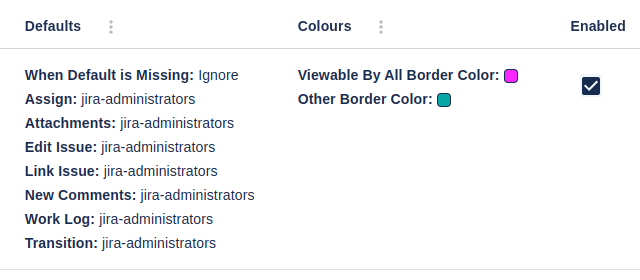
Comment Security Default enforces the default. Comments default to the visibility you configure — globally, per project, or per role — and users can still override on a per-comment basis if they choose. The failure mode of “user forgot” simply stops existing.
If your environment handles any sensitive data on Jira issues — customer PII, regulated content, internal pricing, M&A, HR investigations — relying on humans to remember is a real, measurable risk. Comment Security Default closes the gap with a product that takes minutes to install.
Side-by-side
| Capability | Native Jira | Comment Security Default |
|---|---|---|
| Restrict individual comment visibility (manual) | ✓ | ✓ |
| Default visibility set globally | ✗ | ✓ |
| Default visibility set per project | ✗ | ✓ |
| Default visibility set per role or group | ✗ | ✓ |
| Users can still override default on a per-comment basis | N/A | ✓ |
| Enforce visibility for comments created via email/automation | ✗ | ✓ |
| Audit log of default-visibility configuration changes | ✗ | ✓ |
| Visual indicator of restricted comments | ✓ | ✓ |
| Works in JSM agent UI | Limited (internal/external only) | ✓ |
| Works in Jira Software, Work Management, Service Management | Partial | ✓ |
| Requires user training | High (every user, every comment) | Low (set once) |
| Failure mode if a user forgets | Comment is exposed | Default protection still applies |
| Jira Cloud edition | ✓ | ✓ |
| Jira Data Center edition | ✓ | ✓ |
Why the policy-and-training approach fails
This is the honest part. We’ve watched many teams try it. The failure pattern is consistent:
- Week 1: Security writes a policy. Comments containing customer-identifiable data should be marked Customer-NDA. The policy goes in the wiki.
- Week 2-6: Everyone is trained. There’s an all-hands. The policy is added to onboarding.
- Months 1-3: Compliance rates are around 80-90%. Most comments are correctly restricted. A few aren’t.
- Month 6: A new hire joins. They miss the training session. They post a comment with a customer’s full email address in cleartext, default-visible. Customer Success notices six weeks later.
- Month 7: Incident response. Apologies. Policy re-issued. New training cycle.
- Month 12: The audit finds three more cases. Repeat.
This is not a failure of the team. It’s a structural failure of relying on humans to remember a security action on every interaction. Defaults are how you fix it.
When the policy-and-training approach is genuinely sufficient
Honesty matters. Policy-and-training does work for some environments:
- Truly low-risk Jira tenants. Internal hobby projects, sandbox tenants, OSS development with no proprietary data. The cost of a leak is approximately zero. Then yes, native Jira plus policy is fine.
- Single-team, single-room organisations. A 6-person team in one office where everyone sees everything anyway. The comment-visibility model doesn’t add value.
- Heavily integrated, code-driven tenants. If literally every comment is created through an integration you control (and not by humans typing), the integration sets the visibility and human forgetting isn’t a factor. This is rare in practice.
Outside these cases, the do-nothing approach has predictable failure modes.
When Comment Security Default is the right pick
- Regulated industries. Financial services, healthcare, defence, GxP-regulated life sciences, public sector — these environments cannot tolerate per-comment failure rates. The default needs to be safe.
- Customer data on Jira issues. If support tickets contain customer email addresses, names, internal IDs, or any identifiable information, default-visible is the wrong setting.
- Multi-team tenants. When more than one team uses the same Jira instance, the lowest-trust user determines the safe default. Comment Security Default lets you set that default per project, so high-trust projects can be more open and high-sensitivity projects locked down.
- You already have a compliance posture. SOX, HIPAA, ISO 27001, SOC 2 — these frameworks expect default-deny on sensitive data flows. Comment Security Default maps directly to that control requirement.
Cost considerations
Comment Security Default is priced on the Atlassian Marketplace, tiered by Jira user count. Current pricing is best read from the live Marketplace listing:
Comparing against “free” is misleading. The actual cost of policy-and-training includes: training time, training-content development, audit findings, incident response, customer-trust damage from leaks, regulatory penalties where applicable. For any tenant where one leaked comment matters, Comment Security Default pays for itself the first time it would have caught the failure that didn’t happen.
Get started
The fastest way to evaluate Comment Security Default is to install the free trial, configure default visibility for a single project to a role or group, post test comments as different users, and confirm the default sticks without any user action.
See also
- Comment Security Default [Cloud]](/comment-security-default-overview-cloud/)/[Data Center]](/comment-security-default-overview/) overview— the full product page
- Comment Security Default Cloud/Data Center user guide — every feature documented
- Comment Security Default reviews — what existing customers say
- Comment History for Jira — the companion product for capturing edits and deletes
- Document Vault — for the parallel problem on attachments
- Custom Fields for Projects — for the parallel problem on field values
- Contact Us — book a demo to map default-visibility configuration to your data classification policy