








This comparison is for teams who have already concluded that native Jira’s lack of comment-edit history is unacceptable and are picking between Comment History for Jira by Redmoon Software and Comment History Log for Jira. Both apps appear on most Atlassian admin shortlists for this category. They solve the same problem with slightly different surfaces.
The 30-second answer
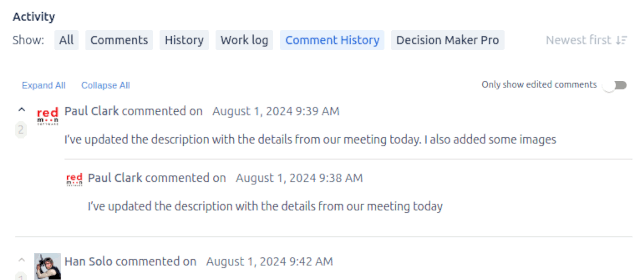
Comment History for Jira presents every prior version of a comment as a full, expandable record nested under the comment in the Jira UI. You can read the whole text of any old version, see who edited it and when, and view deleted comments that would otherwise be gone forever.
Comment History Log emphasises a visual delta-diff view between versions — strike-through for removed text, highlight for added text. Some teams prefer this for spotting what changed; others find the full-version view clearer.
If your auditors care about “what did this comment originally say” — full-version is easier. If your teams care about “what did the last edit change” — delta-diff is easier. Neither is universally better; pick the surface that matches how your readers actually read.
Side-by-side
| Capability | Comment History for Jira | Comment History Log |
|---|---|---|
| Captures every comment edit | ✓ | ✓ |
| Captures comment deletions | ✓ | ✓ |
| Full prior-version text shown | ✓ | ✓ (in diff view) |
| Visual delta-diff between versions | Available on hover | Primary view |
| Hierarchical/threaded display under each comment | ✓ | ✗ (list view) |
| Audit by author and timestamp | ✓ | ✓ |
| Restores accidentally deleted comments | View only | View only |
| Works in standard Jira issue view | ✓ | ✓ |
| Permission-aware (respects comment visibility) | ✓ | ✓ |
| Exportable history | ✓ | ✓ |
| Jira Cloud edition | ✓ | ✓ |
| Jira Data Center edition | ✓ | ✓ |
| Project-level enable/disable | ✓ | ✓ |
| Affects Jira native UI footprint | Minimal | Minimal |
When Comment History for Jira is the right pick
- Auditors read full comment text. SOX, GxP, ISO 27001 reviewers typically want to see the entire prior version of a comment, not just the diff. Comment History for Jira gives them that view by default.
- You want history visible in-line on the issue. Comment History for Jira nests prior versions directly beneath the comment they belong to. No new tab, no separate report.
- You’re on the Redmoon stack already. If you already use Comment Security Default Data Center/Cloud or Document Vault [Data Center]](/document-vault-overview/)/[Cloud]](/document-vault-overview-cloud/), staying with one vendor simplifies licensing, support, and renewal cycles.
- You need Data Center. Comment History for Jira has a mature Data Center edition with the same hierarchical history view as Cloud.
When Comment History Log is the right pick
- Your team thinks in diffs. Engineering teams who already read pull-request diffs daily often find the delta-diff format more natural than reading two full versions side-by-side.
- Comments tend to be long. When a comment is multiple paragraphs and only one sentence changed, a delta-diff highlights the change immediately. Full-version side-by-side requires reading both.
- You’re already a Comment History Log customer. Migrating between audit apps is usually not worth the disruption unless one tool is missing a feature you need.
Be honest: for most teams, this comes down to UX preference, not feature checklists. Run a one-day trial of each on the same project and ask three of your team’s heaviest comment authors which they’d rather read.
What they both fix
Native Jira deletes the prior content of a comment when a user edits it. Native Jira deletes the comment outright on delete. There is no recovery. This is a well-known gap that has been on the Jira backlog for over a decade and is unlikely to be fixed natively.
Both Comment History for Jira and Comment History Log fix this gap. Either app, installed on day one, will retain edits and deletions from that point forward.
Neither app retrospectively reconstructs comment history from before installation — that data is gone. Install ASAP if your compliance posture requires it.
Cost considerations
Both apps are priced on the Atlassian Marketplace, tiered by Jira user count. Pricing is best read from the live Marketplace listings:
Both apps are inexpensive relative to the cost of an audit finding caused by missing comment history. For most teams the differentiator is fit and support quality, not price.
Get started
The fastest way to evaluate Comment History for Jira is to install the free trial against a test project, edit a few comments, and view the resulting history.
See also
- Comment History overview — the full product page
- Comment History user guide (Cloud) — every feature documented
- Comment History use cases — scenarios where the app pays for itself
- Comment History reviews — what existing customers say
- Comment Security Default Cloud/Data Center — the companion app that fixes default comment visibility
- Contact Us — book a demo to compare side-by-side against your specific audit workflow