








How to See Who Changed or Deleted a Jira Comment
A comment gets edited or quietly deleted on a Jira issue, and someone asks: who changed that, and what did it originally say? This is one of the most common Jira support questions, and the honest answer is: native Jira wasn’t built to answer it reliably.
What Jira shows you natively
When a comment is edited, Jira marks it with an “edited” label. Depending on your Jira version and permissions, clicking that label can show you a limited view of recent prior versions of the comment. This is useful for catching a recent, single edit — but it isn’t a durable audit trail: how much history is retained, and whether it’s exposed in the UI at all, varies by Jira Cloud vs Data Center and by version.
Deleted comments are the bigger gap. Once a comment is deleted, its content is generally not recoverable through the standard issue view — there’s no “restore” button, no visible trace that a comment ever existed there. For a team that needs to answer “what did that deleted comment actually say, and who removed it,” native Jira has no reliable, permission-respecting way to find out.
This matters more than it might sound like on first read. Comments often carry decisions, approvals, customer commitments, or compliance-relevant statements. If your team is in a regulated industry, or simply wants to be able to answer “who said what, and when” months after the fact, the gap between “edited label” and “full audit trail” is a real operational risk.
Why this is hard to solve with process alone
Some teams try to solve this with policy — “don’t delete comments, just add a correction” — but policy doesn’t stop someone from deleting a comment by mistake, and it doesn’t help you investigate something that happened before the policy existed. You need the underlying data captured automatically, not a rule people are supposed to follow.
What full comment history actually requires
- Every edit captured, not just the most recent one — a comment edited five times should show all five versions, not just the latest “edited” state.
- Deleted comments preserved, including their full content and who deleted them — the exact case native Jira doesn’t cover.
- Author and timestamp on every version, so you can reconstruct exactly what changed, when, and by whom.
- Respect for existing Jira permissions — comment history shouldn’t leak restricted comments to users who couldn’t see the original.
- Data that stays inside your Jira instance — for many teams, especially regulated ones, sending comment content to a third-party server isn’t acceptable at all.
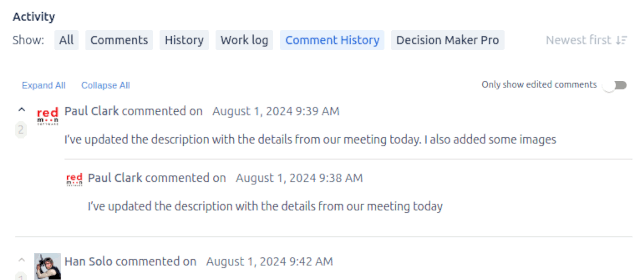
This is what Comment History for Jira is built around. It adds a Comment History tab to every issue’s Activity section, listing every current comment together with its complete edit and deletion history, grouped chronologically. Click the clock icon next to any comment to see a popup with every previous version — including the content of versions that were later deleted. History respects Jira’s existing comment visibility rules, so restricted comments stay restricted to the same audience. And it runs entirely inside your Jira instance: no comment text, history, or user information is sent to any third-party server.
Finding a specific change, step by step
- Open the issue and go to its Comment History tab in the Activity section (once Comment History is installed — natively, skip to the manual check below).
- Locate the comment in question — the tab lists every comment on the issue, current and deleted, in chronological order.
- Click the clock-with-arrow icon next to it to open the full version history: every prior edit, the author, and the timestamp of each change.
- If the comment was deleted, its full content and deletion record are still visible in the same history — no separate recovery process needed.
Without a dedicated app, the manual equivalent is asking a Jira admin to check the audit log (if audit logging is enabled and retains that far back) or, in some cases, going to the database directly — neither of which is realistic for a non-admin trying to answer a quick question about a specific comment.
Frequently asked questions
Does Jira keep a record of every comment edit by default? Only partially, and it varies by version and permission level. A limited “edited” indicator exists, but there’s no guaranteed, permanent, every-version history built into standard Jira.
Can I recover a deleted Jira comment natively? Generally, no — once a comment is deleted, its content isn’t recoverable through the standard issue view. This is the single biggest gap between native Jira and a dedicated comment-history tool.
Who can see comment history if I install a history-tracking app? A well-built comment history feature respects Jira’s existing comment visibility rules — if a comment was restricted to a specific group, its history stays restricted to that same group, not exposed to every issue viewer.
Does comment history send my data outside my Jira instance? It shouldn’t need to. Comment History for Jira stores everything inside your own Jira Data Center or Cloud instance — nothing is sent to Redmoon Software’s servers or any third party.
See also: Comment History user guide · Comment History use cases · Comment History reviews.