








How to Restrict Jira Comments and Secure Admin Access
Two of the most common Jira access-control questions have the same underlying problem: native Jira makes visibility and access an opt-in choice for the user, not a default the organization controls. One is about comments; the other is about admin tabs. Both are solvable, but not with native settings alone.
Restricting who sees a Jira comment
How comment visibility works natively
When someone adds a comment in Jira, they can click “Viewable by” and pick a project role or group to restrict it to — otherwise, the comment is visible to everyone with issue access. Jira Service Management adds a second axis: Internal vs Customer-facing comments on a request.
This is a real, working feature — but it depends entirely on the person writing the comment remembering to restrict it, every single time, correctly. There is no native way to say “comments in this project default to internal-only unless someone chooses otherwise” — the default is always public-to-everyone-with-access, and restriction is always a manual, per-comment opt-in.
Where this breaks down
- One missed restriction leaks sensitive information. A support agent forgets to mark a comment internal-only on a JSM ticket, and a customer sees an internal note about pricing, a colleague’s mistake, or an unresolved security issue.
- New team members don’t know the convention. “We always restrict comments with X in them” is a rule that lives in someone’s head, not in Jira’s configuration — every new hire has to learn it, and every busy day is a chance to forget it.
- There’s no visual cue. A comment that should have been restricted looks identical to one that was — nothing on screen flags the mistake before it’s posted.
Setting a default instead of relying on memory
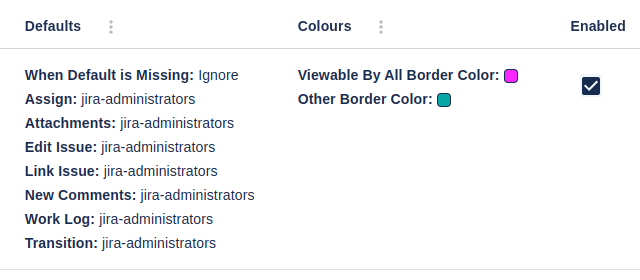
Comment Security Default flips the model: instead of every comment defaulting to public and requiring a manual restriction, administrators set the default visibility level for new comments, attachments, work logs, issue links, and edits. Defaults can target specific user groups, project roles, or workflow transitions, and can be configured per-project or globally. Comment Security Default also supports Jira Service Management specifically — including options for the customer/internal tab order and default visibility on service desk comments — and can color-code comment fields so it’s visually obvious before saving whether a comment will be public or restricted.
Restricting Jira admin access
How admin access works natively
Jira’s administration area has five top-level tabs — Projects, Issues, User Management, System, Add-ons — and native Jira’s access model is essentially binary: a user either has the Jira Administrators global permission and sees all of it, or they don’t and see none of it. There’s no native way to grant someone access to just User Management without also handing them System configuration, licensing, and every add-on’s admin screens.
Where this breaks down
Most teams eventually want to delegate some admin work without handing out full admin rights — someone who manages users and groups but shouldn’t touch system mail configuration, or a project lead who needs to manage a specific third-party app’s settings but nothing else. Native Jira forces a choice between over-provisioning access (full admin, more risk) or under-provisioning it (no delegation at all, and everything routes through a small admin team that becomes a bottleneck).
Delegating admin access safely
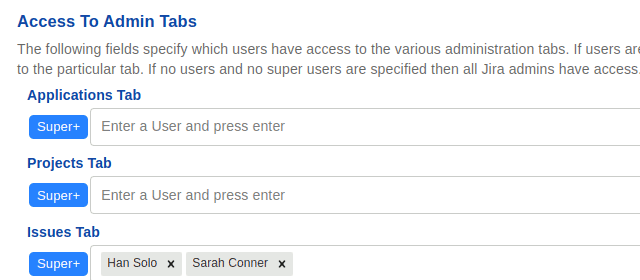
Secure Admin restricts access to Jira’s five top-level admin tabs — and to specific sub-tabs and custom admin pages within them — so you can delegate pieces of administration without granting full admin rights. Sub-tabs (such as Incoming Mail or User Anonymizer) can be whitelisted per user or group even if that user has no access to the parent tab at all. Custom Page Access extends the same model to admin pages from third-party Jira apps — identify the page by its URL slug and assign access by user or group, while every unspecified page stays open to full admins. A “Full Access” list defines the super-users who retain access to everything, so you’re narrowing access for everyone else without losing a way to manage the whole instance.
A practical starting point for both
- List what’s actually sensitive — which comment types (pricing, incident details, HR-adjacent notes) and which admin functions (user management, mail config, licensing) genuinely need restriction, rather than restricting everything by default and generating friction nobody wants.
- Start with one default, one delegation. Set a single project’s comment default to internal-only for JSM requests, or delegate a single admin sub-tab to a specific person — confirm it behaves as expected before rolling out more broadly.
- Document the policy once it’s configured, not before — since the tool now enforces the default, the documentation is explaining the system’s behavior rather than asking people to remember a manual convention.
Frequently asked questions
Does Jira restrict comment visibility by default? No — new comments are visible to everyone with issue access unless the author manually restricts them via “Viewable by.” There’s no native way to set a default that applies automatically.
Can I delegate part of Jira’s admin area without granting full admin rights? Not with native Jira alone — admin access is effectively all-or-nothing at the global-permission level. Delegating specific tabs or sub-tabs requires a dedicated access-control app.
Can admin-access restrictions cover third-party app admin pages, not just Jira’s own tabs? Yes, with Secure Admin’s Custom Page Access feature — it identifies third-party admin pages by URL slug and applies the same per-user or per-group access rules Jira’s own tabs get.
Do comment-visibility defaults work differently on Jira Service Management? JSM adds an internal/customer-facing axis on top of standard comment visibility. Comment Security Default supports JSM specifically, including default visibility for service desk comments and customer/internal tab ordering.
See also: Secure Admin vs ScriptRunner for Jira · Comment Security Default reviews · Secure Admin use cases.